


Here's something nobody says out loud - a default EC2 instance is not production-ready. It works, but it's held together by a single security group with no real isolation. Fine for learning. Not fine for anything that matters.
VPC - Virtual Private Cloud - is how you define networking on AWS properly. Your IP ranges, your subnets, your routing rules, your access boundaries. Everything is explicit. Nothing is assumed.
The Core Idea
A VPC is a logically isolated network inside an AWS region. "Logically isolated" means your traffic doesn't bleed into another account's network and theirs doesn't bleed into yours — even if you're running on the same physical hardware.
You define the address space using a CIDR block. Something like 10.0.0.0/16 gives you 65,536 IP addresses to work with across everything you deploy inside that VPC. That's the boundary. Everything else is about controlling what moves across it.
Subnets
You don't throw everything into one flat network. Subnets let you carve the VPC's address space into smaller chunks, each serving a specific purpose.
A typical setup has public subnets and private subnets:
Public subnets are reachable from the internet. Your load balancers live here.
Private subnets are not directly reachable from the outside. Your application servers, databases, and anything sensitive lives here.
This separation is the core of network security in AWS.
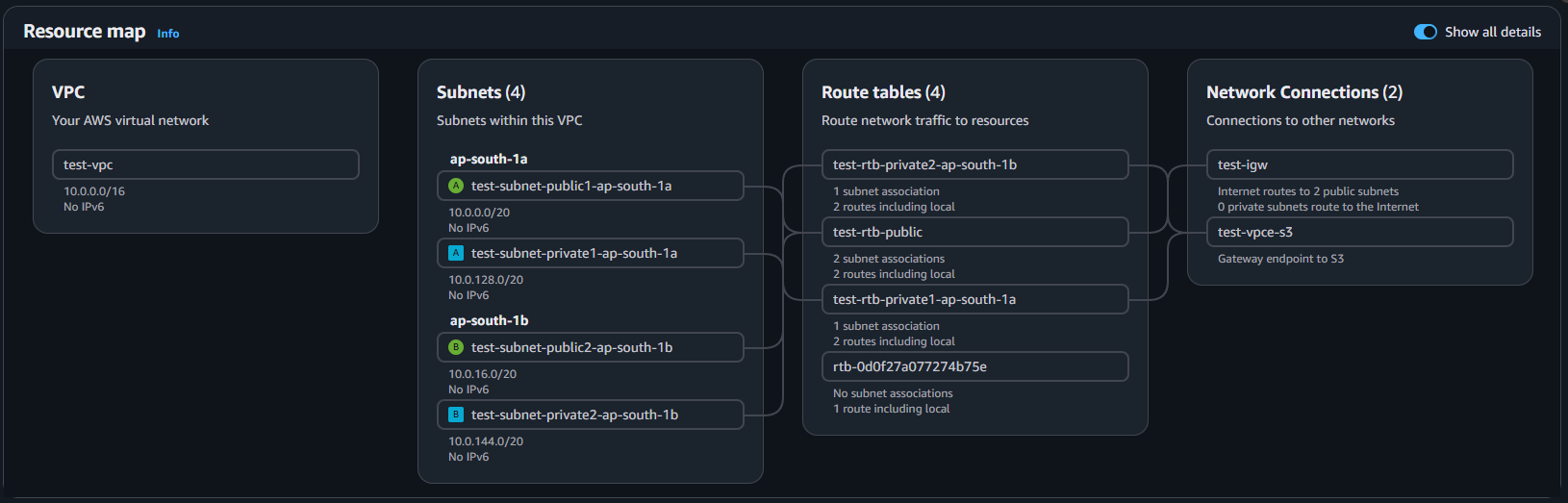
Internet Gateway
An internet gateway is exactly what it sounds like - the entry and exit point between your VPC and the public internet. Without one attached to your VPC, nothing inside can communicate with the outside world and nothing outside can reach in.
Attaching an internet gateway to your VPC is necessary but not sufficient for internet access. You also need route tables configured correctly to direct traffic through it, and your resources need to be in public subnets.
Route Tables
Route tables define where network traffic goes. Every subnet has an associated route table that tells traffic: if you're trying to reach this destination, go this way.
A public subnet's route table typically has a rule pointing internet-bound traffic (0.0.0.0/0) to the internet gateway. A private subnet's route table has no such rule - that's what keeps it private. Traffic within the VPC flows internally, but there's no path out to the internet unless you explicitly create one.
Security Groups
Security groups are instance-level firewalls. They control inbound and outbound traffic to individual resources - EC2 instances.
You define rules: allow TCP on port 443 from anywhere, allow port 5432 only from your application server's security group, block everything else.
NACLs (Network Access Control Lists)
It operate at the subnet level and are stateless. You need explicit rules for both inbound and outbound traffic. They support both Allow and Deny rules, and they're evaluated in order - rule 100 before rule 200 before rule 300.
In practice: security groups handle almost everything. NACLs are a secondary layer for blanket subnet-level rules - blocking a known malicious IP range across an entire subnet, for example, without touching every individual security group.
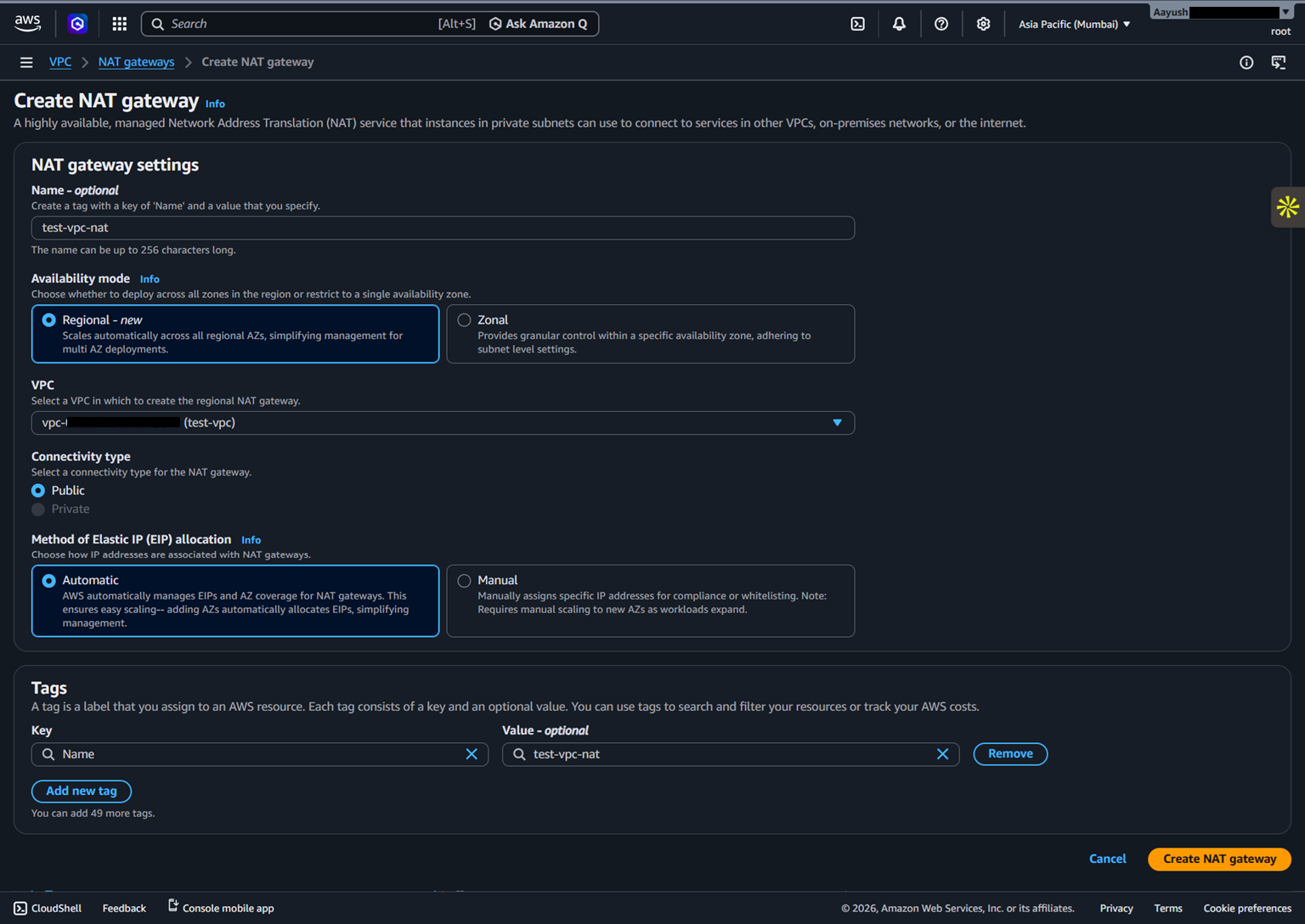
NAT Gateway
Here's a scenario that comes up constantly: you have an EC2 instance in a private subnet. It has no public IP, can't be reached from the internet - good. But you need it to download a package, make an API call, or pull an update from the internet.
How does a private resource reach the internet without exposing itself?
| Security Groups | NACLs | |
|---|---|---|
| Level | Instance | Subnet |
| Stateful | Yes | No |
| Rule types | Allow only | Allow + Deny |
| Evaluation | All rules | In order |
NAT Gateway. It lives in the public subnet and acts as an intermediary. Your private instance sends traffic through the NAT Gateway, which makes the request to the internet on its behalf - using the NAT Gateway's public IP, not your instance's private IP. The response comes back through the NAT Gateway to your instance.
Your server's actual IP address is never exposed to the outside world. That's the point.
How Traffic Actually Flows
Put it all together and here's what happens when a user on the internet tries to reach your application running in a private subnet:
Request hits the Internet Gateway - the entry point into your VPC
Routes through the public subnet to your Load Balancer
Load balancer checks its target group and forwards to the right instance
Route table in the private subnet defines the path to that instance
Security group on the instance checks if the traffic is allowed
Request reaches your application
Every hop is intentional, every boundary is defined. Nothing gets through unless you've explicitly allowed it.
VPC Flow Logs: The Visibility You Don't Have by Default
By default, you have zero visibility into what traffic is actually moving through your VPC. You don't know which IPs are hitting your instances, which requests are being rejected by security groups, or whether something inside your network is making unexpected outbound connections.
VPC Flow Logs captures metadata for all traffic flowing through your VPC - source IP, destination IP, ports, protocol, whether the traffic was accepted or rejected, and by which interface. It doesn't capture packet contents, but the metadata alone is invaluable.
It comes handy when it's time for debugging or auditing.
Want to See It All Wired Together?
AWS's official documentation has a production-grade reference architecture - a VPC with private subnets, NAT gateways across two AZs, an Application Load Balancer, and an Auto Scaling group. It's the closest thing to a blueprint for a standard production VPC setup.
VPC with servers in private subnets and NAT - AWS Documentation
About the author
- DevOps engineer focused on building, automating, and securing cloud infrastructure. I work with AWS, Docker, Terraform, and CI/CD pipelines to ship scalable and reliable systems. I write about cloud services & architecture, deployment strategies, and real-world DevOps practices.
Comments
Join the discussionNo comments yet. Be the first to comment.
AWS
Breaking down AWS from the ground up - IAM, EC2, VPC, S3, and beyond. Real concepts, real depth, no fluff.


