

For a long time my idea of "infra provisioning" was logging to the console, making a few clicks through a few pages and done. It worked until it didn't . Until I had to recreate an environment and had no idea what I'd actually configured. Until someone else on the team had to touch the same setup and had zero context.
That's what Infrastructure as Code fixes. And Terraform is, in my opinion, the cleanest way to do it.
This series documents everything I've learned about Terraform - practically, with real configs and real AWS resources. Let's start from the beginning.
The Problem with Manual Infrastructure
Before tools like Terraform existed, setting up infrastructure meant one of two things: clicking through cloud consoles manually, or writing custom shell scripts to call cloud APIs. Both approaches have the same fundamental problems.
No version control, No repeatability, No review process, Drift
IaC addresses all of this. You define your infrastructure in code files, commit them to version control, review them like any other code change, and let the tool handle actually creating and managing the resources.
A few core concepts
Before writing any code, these are the terms that'll come up constantly:
Provider - a plugin that lets Terraform talk to a specific platform. The aws provider talks to AWS APIs. The google provider talks to GCP. You declare which providers you need and Terraform downloads them automatically.
Resource - the actual infrastructure component you're creating. An EC2 instance is a resource. An S3 bucket is a resource. Every resource has a type and a name.
State file (terraform.tfstate) - Terraform's record of what it has created. It maps your config to the real resources in your cloud account. This helps it to know what to update vs. what to create fresh.
Plan - a dry run. terraform plan compares your config to the current state and shows you what would change. Nothing is actually modified.
Apply - terraform apply executes the plan. Resources get created, updated, or destroyed based on what your config says.
Module - a reusable package of Terraform config.
Remote Backend - instead of storing the state file on your local machine, you store it remotely (S3, Terraform Cloud, etc.). To avoid state conflicts.
Workspace - a way to maintain separate state files for different environments (dev, staging, production) within the same config.
You can install terraform from here.
Also we'll be using AWS cloud, so have your AWS CLI configured as well.
Your First Terraform Config
Terraform uses .tf extension and is written HCL (HashiCorp Configuration Language).
Create a project directory and a main.tf file:
mkdir terraform-learning && cd terraform-learning
touch main.tf
This is a very simple tf config to create an EC2 instance:
provider "aws" {
  region = "ap-south-1"
}

resource "aws_instance" "my_first_instance" {
  ami           = "ami-0c55b159cbfafe1f0"  # Amazon Linux 2 - change for your region
  instance_type = "t2.micro"
}
The Provider Block
provider "aws" {
  region = "ap-south-1"
}
This tells Terraform: "I'm using AWS, specifically in the ap-south-1 region." When you run terraform init, Terraform downloads the AWS provider plugin - the code that knows how to talk to AWS APIs.
The Resource Block
resource "aws_instance" "my_first_instance" {
  ami           = "ami-0c55b159cbfafe1f0"
  instance_type = "t2.micro"
}
The resource block has a specific structure:
resource "<resource_type>" "<local_name>" {
  <arguments>
}
aws_instance- the resource type. This tells Terraform and the AWS provider what kind of thing to create. The naming convention is always<provider>_<service>.my_first_instance- the local name. This is used for referencing the resource in the rest of the config. This doesn't affect what gets created on the AWS side.ami- the Amazon Machine Image ID. This is the OS template for your instanceinstance_type- the hardware spec.
The Terraform Workflow
Three commands. This is the core loop you'll use for everything.
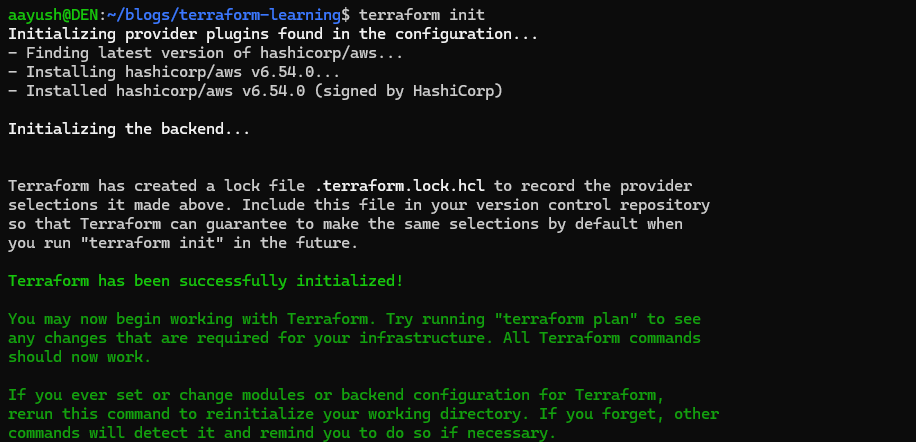
terraform init
terraform init
Run this first, in every new project directory. It downloads the necessary plugins and sets up the backend for state storage.
terraform plan
terraform plan
The dry run. Terraform reads your config, checks the current state, and tells you exactly what it would do - without actually doing it.
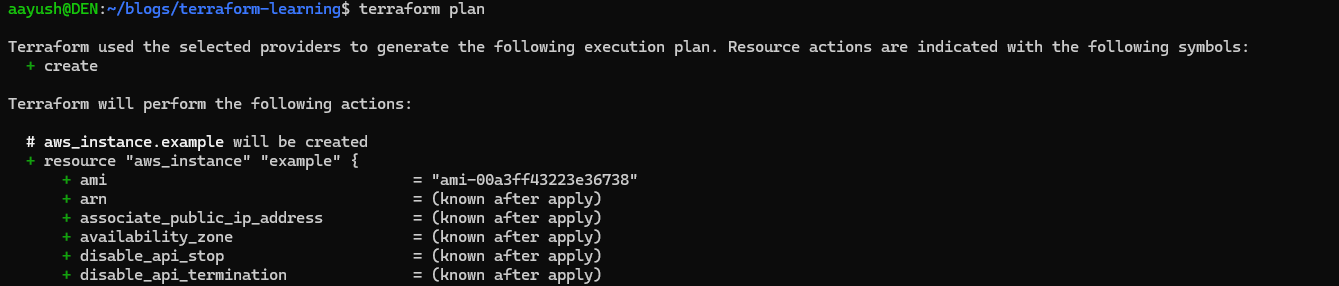
The
+means create. Later you'll see~for modify and-for destroy. Always read the plan before applying.
terraform apply
terraform apply
Terraform shows the plan again and asks for confirmation, type yes and hit Enter. Terraform creates your EC2 instance.
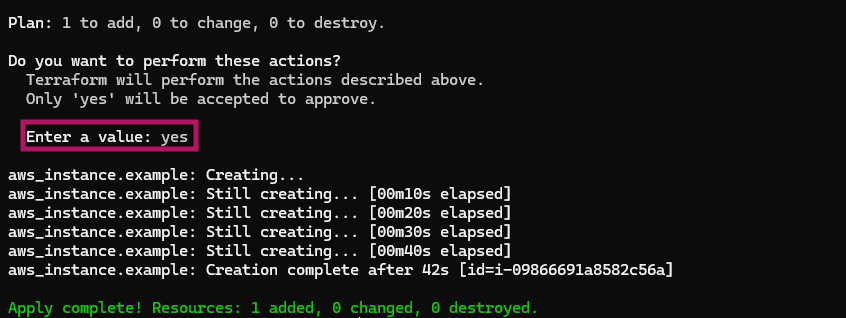
You can check your AWS console, the instance is there:

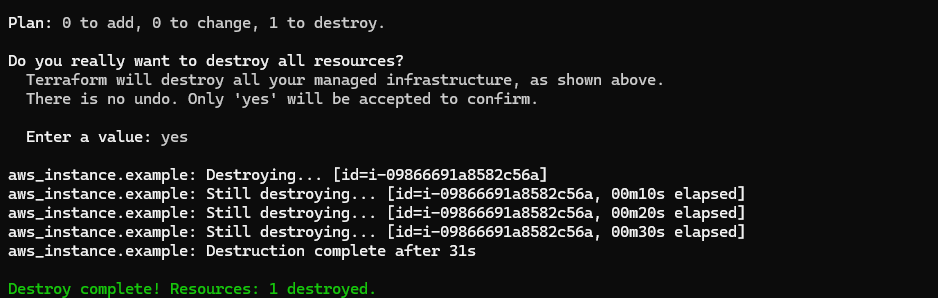
terraform destroy
When you're done and want to clean up:
terraform destroy
Terraform shows you everything it's about to delete and asks for confirmation, similar when you do terraform apply. It removes all resources it created. Your AWS bill thanks you.
Providers in Depth
The provider block deserves a bit more attention because there are a few ways to configure it.
Basic Provider Config
The simplest form - just declare it in your root main.tf:
provider "aws" {
  region = "ap-south-1"
}
Using Multiple Providers
One of Terraform's real strengths is that you're not limited to one provider per config. You can mix AWS and GCP in the same file, or use multiple regions of the same provider with aliases:
provider "aws" {
  region = "ap-south-1"
  alias  = "mumbai"
}

provider "aws" {
  region = "us-east-1"
  alias  = "virginia"
}

resource "aws_instance" "india_server" {
  provider      = aws.mumbai
  ami           = "ami-0c55b159cbfafe1f0"
  instance_type = "t2.micro"
}

resource "aws_instance" "us_server" {
  provider      = aws.virginia
  ami           = "ami-0c55b159cbfafe1f0"
  instance_type = "t2.micro"
}
Two instances, two regions, one terraform apply.
Understanding Resources
The resource block is where most of your Terraform config lives. The pattern is consistent across every resource type:
resource "<provider>_<type>" "<local_name>" {
  # arguments specific to this resource type
}
After a resource is created, you can reference its attributes using dot notation:
resource "aws_instance" "web" {
  ami           = "ami-0c55b159cbfafe1f0"
  instance_type = "t2.micro"
}

# Reference the public IP of the instance created above
output "server_ip" {
  value = aws_instance.web.public_ip
}
aws_instance.web.public_ip - provider type, local name, attribute. This pattern comes up constantly when resources depend on each other. Say you create a VPC and then an EC2 instance inside it - the instance references the VPC's ID using this same notation.
Resource Dependencies
For cases where a resourced depends on some other resource, example a security group must be created before the EC2 instance, in such cases, you can use depends_on:
resource "aws_instance" "app" {
  ami           = "ami-0c55b159cbfafe1f0"
  instance_type = "t2.micro"
  depends_on    = [aws_security_group.app_sg]
}
One Thing Worth Understanding Early: Desired State vs Current State
Terraform is always comparing two things:
Desired state - what your .tf files say should exist.
Current state - what terraform.tfstate says currently exists.
When you run terraform plan, Terraform computes the diff between these two. If they match, nothing happens. If they differ, Terraform tells you exactly what it needs to do to bring current state in line with desired state.
This has a practical implication: if you manually change something in the AWS console - say you change an instance type directly - Terraform will see that the current state no longer matches your config. The next terraform plan will show a change, and the next terraform apply will revert it back to what your code says.
This is also why you should never manually edit the state file. It's Terraform's internal record - touch it and you can end up in a situation where what Terraform thinks exists doesn't match what actually exists in your cloud account.
This is also called state drift.
Next, make configs actually reusable. Variables, outputs, and terraform.tfvars are what turn a one-off config into something you can actually share and reuse across environments, till then stay tuned. Keep Balling.
About the author
- DevOps engineer focused on building, automating, and securing cloud infrastructure. I work with AWS, Docker, Terraform, and CI/CD pipelines to ship scalable and reliable systems. I write about cloud services & architecture, deployment strategies, and real-world DevOps practices.
Comments
Join the discussionNo comments yet. Be the first to comment.


