

Ansible Part 7 - Collections, Execution Environments and Ansible Navigator

Now that we've come a long way, from, understanding what Ansible is, to writing playbooks, encrypting secrets, building roles. This final one is about what happens when Ansible grows beyond a single person to when teams get involved. When you need consistency across different machines and environments. When "it works on my machine" stops being acceptable.
That's where Collections, Execution Environments, and Ansible Navigator come in. They make ansible from a personal automation tool to something you can run at enterprise scale.
Collections - Packaging Ansible Content
We're already aware of roles, Collections are a level up. A collection is a packaging format that bundles together:
Modules: the Python scripts that do the actual work.
Roles: Reusable task structures
Plugins: Extension to Ansible's core functionality
Dependencies: Other collections we need
if a role is a reusable chunk of automation logic, a collection is a distributable package that can contain multiple roles, plus the modules and plugins they depend on.
Why Collections Exist
Before collections, everything lived in ansible-core, which was a big problem. Every module for every service was shipped with Ansible itself. This meant
Ansible releases were enormously huge.
A bug fix in a module required a full Ansible release.
The ansible- core had 3000+ modules bundled in it.
Collections decoupled contents from the core. Now ansible-core ships lean with only the essentials and everything else is is to be installed independently.
Collection Naming
Collections follow a namespace.collection_name.module_name convention.
ansible.builtin- the built-in modules that ship with ansible-core (user,yum,copy,template, etc.)ansible.posix- POSIX-related modules (firewall, file permissions, etc.)amazon.aws- AWS modules (EC2, S3, RDS, etc.)google.cloud- GCP modules
When we write yum in a task, we're actually calling ansible.builtin.yum. The short name works because ansible.builtin is always available, but using the fully qualified name is the best practice:
# Short form - works but not explicit
- name: install httpd
  yum:
    name: httpd
    state: present

# Fully qualified - explicit and unambiguous
- name: install httpd
  ansible.builtin.yum:
    name: httpd
    state: present
The fully qualified form becomes important when you have multiple collections installed and want to be absolutely sure which module you're calling.
Installing Collections
Collections live on Ansible Galaxy and are installed with:
# Install a single collection
ansible-galaxy collection install ansible.posix -p ./collections/
-p flag is to specify path where you want to install the collection
# List installed collections
ansible-galaxy collection list
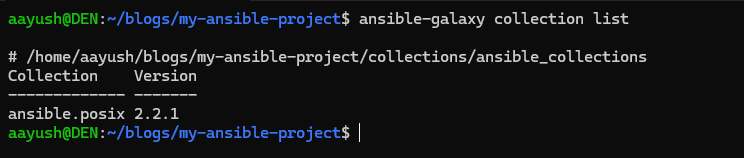
Using a Collection in a Playbook
Once installed, you reference collection modules in your tasks:
---
- name: manage firewall rules using ansible.posix
  hosts: servera
  collections:
    - ansible.posix
  tasks:
    - name: allow http traffic on port 80
      ansible.posix.firewalld:
        port: 80/tcp
        permanent: true
        state: enabled
Ansible Navigator - A Better Interface for Everything
ansible-navigator is a command-line tool (with an optional text UI) that wraps Ansible operations and adds proper EE support, better output formatting, and inspection capabilities.
Running a Playbook
Instead of ansible-playbook:
ansible-navigator run 05-facts.yml
By default, navigator runs inside an EE (the ee-supported-rhel9 image unless you configure otherwise). This means you don't need Ansible or any collections installed locally - the EE container has everything.
Viewing Playbook Output
Navigator stores run history and lets you review it:
# Run and save the output
ansible-navigator run 05-facts.yml --log-file ./logs/run.log

# Replay a previous run's output interactively
ansible-navigator replay ./logs/run.log
For long-running playbooks or post-incident review, being able to step through exactly what happened in a previous run - task by task.
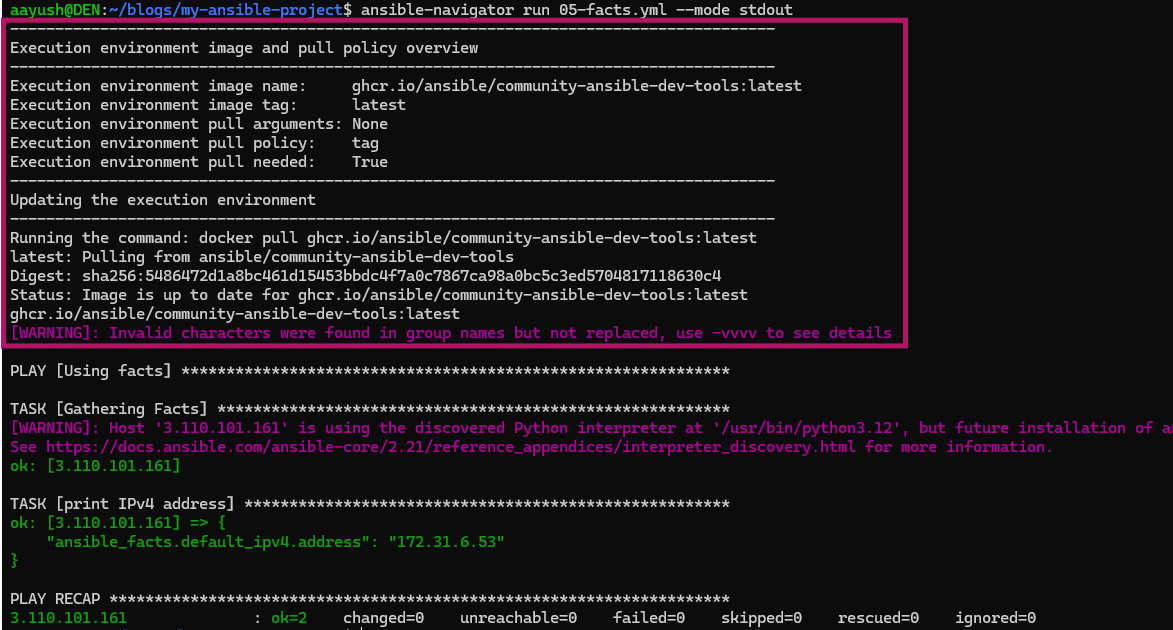
EE image is pulled and used before running
Now, here we come to the end on the Ansible series.
From a blank terminal to understanding how enterprise Ansible actually works.
There's still plenty to explore from here, but everything you encounter from here builds on what's in this series. You have the foundation.
You can find all the playbooks and resources [here]
Keep Balling, Go Automate Something!!
About the author
- DevOps engineer focused on building, automating, and securing cloud infrastructure. I work with AWS, Docker, Terraform, and CI/CD pipelines to ship scalable and reliable systems. I write about cloud services & architecture, deployment strategies, and real-world DevOps practices.
Comments
Join the discussionNo comments yet. Be the first to comment.


